What Is Phishing? How to Recognize Email Scams and Stay Safe
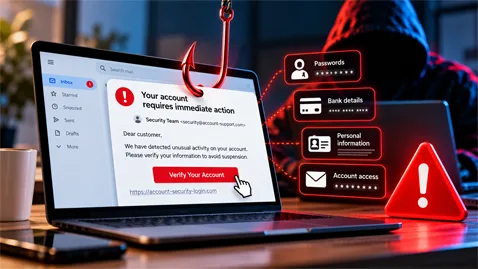
Phishing is one of the most common cyber threats. Learn how scammers steal personal information, how to spot fraudulent emails, and how SPF, DKIM, and DMARC help protect your inbox.
Phishing: Understanding This Cyber Scam and How to Protect Yourself
Phishing is one of the most widespread forms of cybercrime on the Internet. Every day, individuals and businesses receive fraudulent messages designed to steal passwords, banking details, or personal information. How does phishing work, how can you recognize it, and most importantly, how can you avoid falling victim to these scams?
What Is Phishing?
Phishing is a form of online fraud in which cybercriminals impersonate a trusted person, company, or organization to obtain confidential information.
Attackers may pretend to represent a bank, delivery service, government agency, social media platform, or email provider.
The principle is relatively simple: a victim receives a message that appears to come from a legitimate source and is encouraged to take action, usually with a sense of urgency.
This action might involve clicking a link, downloading a document, sharing a security code, or entering login credentials on a fraudulent website.
The objective is to steal sensitive information or gain unauthorized access to an account.
How Does a Phishing Attack Work?
A phishing attack generally follows several stages.
1. Identity Impersonation
The attacker creates a message that imitates communications from a legitimate organization.
They may reproduce its logo, colors, email signature, and even use an email address that closely resembles the company's official address.
Some phishing messages are carefully designed, making them difficult to distinguish from genuine communications.
2. Creating a Sense of Urgency
To pressure victims into acting quickly, phishing messages often contain threats or alarming information.
For example:
- "Your bank account will be suspended within 24 hours."
- "Unusual activity has been detected on your account."
- "Your package could not be delivered."
- "Your password must be updated immediately."
- "A suspicious payment requires your confirmation."
These messages are designed to trigger an emotional reaction before the recipient has time to verify their authenticity.
3. Redirecting Victims to a Fake Website
Phishing messages frequently contain links leading to fraudulent websites.
These websites may closely replicate the appearance and functionality of legitimate services.
When victims enter their usernames, passwords, or banking details, the information is transmitted to the attackers.
In some cases, the fraudulent website also requests a verification code received by SMS to bypass certain account security protections.
4. Exploiting Stolen Information
Once the attackers obtain sensitive information, they may attempt to access the victim's accounts, carry out fraudulent transactions, or use the stolen identity to launch additional scams.
The information may also be sold or reused in other fraudulent campaigns.
The Different Types of Phishing
Phishing is no longer limited to traditional email scams. Cybercriminals have developed several techniques as technology has evolved.
Comments (0)
No comment yet. Be the first!