Email Deliverability Explained: The Complete Guide to DMARC, SPF, DKIM & Email Security
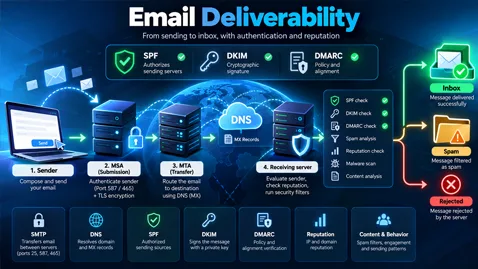
Discover how email deliverability works with this comprehensive guide to DMARC, SPF, DKIM, SMTP, DNS, and email security. Learn how email authentication, sender reputation, and transport security help prevent spoofing, reduce spam issues, and improve inbox placement.
The Complete Guide to Email Deliverability: DMARC, SPF, DKIM, SMTP, DNS, Email Authentication, and Sender Reputation
1. Introduction to Email Deliverability
Email remains one of the most important communication channels for businesses, organizations, software platforms, and individuals. It is used for transactional notifications, password resets, invoices, marketing campaigns, customer support, business correspondence, and security alerts.
However, sending an email does not guarantee that it will reach the recipient's inbox. A message may be delivered to the inbox, placed in the spam folder, temporarily deferred, rejected by the receiving server, or silently filtered by the recipient's email provider.
This is where email deliverability becomes essential.
Email deliverability refers to the ability of legitimate email messages to reach their intended recipients, preferably in the inbox rather than the spam or junk folder. It depends on multiple technical and operational factors, including:
- Email authentication and domain alignment.
- DNS configuration and infrastructure reliability.
- SMTP connectivity and transport security.
- IP address and domain reputation.
- Sending volume and consistency.
- Recipient engagement and spam complaints.
- Message content, formatting, and sending practices.
- Compliance with mailbox provider requirements.
Several protocols and technologies work together to support these requirements. The most important include SMTP, DNS, SPF, DKIM, and DMARC. Additional technologies, such as ARC, MTA-STS, TLS-RPT, DANE, BIMI, and DNSSEC, provide further security and operational capabilities.
Understanding these mechanisms is essential for anyone responsible for managing an email infrastructure, operating a mail server, configuring a sending domain, or troubleshooting delivery problems.
This guide explores the complete email delivery ecosystem, from the moment a message is submitted to the moment the receiving provider decides whether to accept, reject, or filter it.
2. Understanding the Email Delivery Process
Before examining individual protocols, it is important to understand how an email travels across the internet.
A typical email delivery process involves several components.
2.1 The Mail User Agent (MUA)
The Mail User Agent is the application used to compose, send, and read emails.
Examples include desktop email clients, mobile email applications, and webmail interfaces.
The MUA creates the message, including its headers, body, attachments, and recipient information.
2.2 The Mail Submission Agent (MSA)
The Mail Submission Agent accepts outgoing messages from authenticated users or applications.
It commonly uses SMTP submission on port 587 with STARTTLS or port 465 with implicit TLS.
The MSA may enforce authentication, message-size limits, rate limits, sender authorization, and other security policies.
2.3 The Mail Transfer Agent (MTA)
The Mail Transfer Agent is responsible for transferring email messages between mail servers.
When an MTA receives an outgoing message, it determines the destination domain and uses DNS to locate the appropriate receiving server.
It then establishes an SMTP connection and attempts to deliver the message.
2.4 The Mail Delivery Agent (MDA)
The Mail Delivery Agent places an accepted message into the recipient's mailbox or passes it to the relevant storage system.
The exact architecture depends on the email platform.
2.5 The receiving email provider
The receiving provider performs multiple checks before deciding how to handle a message.
These checks may include:
- Sender authentication.
- SPF, DKIM, and DMARC evaluation.
- IP and domain reputation.
- Spam and phishing detection.
- Malware and attachment scanning.
- Rate limits and sending-pattern analysis.
- Local security and filtering policies.
Passing authentication checks does not automatically guarantee inbox placement. Authentication helps establish identity and authorization, while the provider makes a broader filtering decision.
2.6 A simplified email delivery flow
- The sender composes an email.
- The sending application submits the message to an SMTP server.
- The sending server authenticates the user or application.
- DNS identifies the destination mail server through MX records.
- The sending MTA connects to the receiving MTA.
- The receiving server evaluates the connection, sender information, and message.
- SPF, DKIM, and DMARC checks are performed as applicable.
- The receiving provider applies its filtering and reputation systems.
- The message is accepted, deferred, rejected, or delivered to a mailbox folder.
Each stage can introduce problems that affect deliverability.
3. SMTP: Simple Mail Transfer Protocol
SMTP stands for Simple Mail Transfer Protocol. It is the fundamental protocol used to submit and transfer email messages.
SMTP does not, by itself, establish that the visible sender is legitimate. Authentication mechanisms must be used alongside it.
3.1 Common SMTP ports
| PortTypical purpose | |
| 25 | Mail transfer between servers |
| 587 | Authenticated message submission |
| 465 | Message submission with implicit TLS |
Port 25 is generally used for server-to-server mail transfer. Port 587 is widely used by email clients and applications to submit messages to an outgoing server. Port 465 is also used for submission, with TLS established immediately when the connection begins.
The appropriate port depends on the server's configuration and the intended use.
3.2 SMTP commands
SMTP communication uses a sequence of commands and responses.
Common commands include:
EHLO: identifies the client and advertises SMTP extensions.HELO: the traditional SMTP greeting.MAIL FROM: specifies the envelope sender.RCPT TO: specifies a recipient.DATA: begins the transmission of the message content.RSET: resets the current mail transaction.NOOP: requests a basic response without changing the transaction.QUIT: terminates the SMTP session.STARTTLS: requests an upgrade to a TLS-protected connection when supported.
An SMTP server responds with status codes that indicate the result of each operation.
3.3 SMTP response codes
SMTP response codes are generally divided into three broad categories.
- 2xx — Success: the requested operation succeeded.
- 4xx — Temporary failure: the operation failed temporarily and may be retried.
- 5xx — Permanent failure: the operation failed and should not ordinarily be retried without correcting the underlying problem.
For example, a receiving server may temporarily defer a message because of rate limits or a transient infrastructure issue. A permanent rejection may indicate an invalid recipient, a policy violation, or an authentication problem.
The exact interpretation depends on the response code, enhanced status code, and server-specific explanation.
3.4 SMTP does not guarantee inbox placement
A successful SMTP transaction generally means that the receiving server accepted responsibility for the message. It does not prove that the message will appear in the inbox.
The provider may subsequently place it in spam, quarantine it, or apply other filtering rules.
For this reason, SMTP delivery status and inbox placement should be monitored separately.
4. DNS: The Foundation of Email Infrastructure
DNS, or the Domain Name System, translates domain names into information that other systems can use.
For email, DNS provides server-routing information, sender authorization policies, public cryptographic keys, and additional security policies.
A misconfigured DNS zone can cause email delivery failures, authentication errors, or security weaknesses.
4.1 MX records
MX records identify the mail servers responsible for receiving email for a domain.
Example:
dns
example.com. 3600 IN MX 10 mail1.example.com.
example.com. 3600 IN MX 20 mail2.example.com.
The numbers represent MX preference values. Lower values have higher preference, although actual delivery behavior also depends on server availability and the sending MTA's implementation.
4.2 TXT records
TXT records store textual information associated with a DNS name.
They are used to publish SPF policies, DKIM public keys, DMARC policies, and certain verification records.
Example:
dns
example.com. IN TXT "v=spf1 ip4:192.0.2.10 -all"
This is an illustrative SPF record.
4.3 A and AAAA records
A records map a hostname to an IPv4 address, while AAAA records map a hostname to an IPv6 address.
Mail servers commonly need appropriate address records so that other servers can establish connections to them.
4.4 PTR records and reverse DNS
PTR records map an IP address to a hostname.
Reverse DNS is particularly relevant to outbound mail servers. Receiving providers may examine reverse DNS information as part of their connection and reputation checks.
A well-configured outbound mail server should generally have consistent forward and reverse DNS information. However, reverse DNS alone does not establish sender legitimacy.
4.5 CNAME records
CNAME records create aliases from one DNS name to another.
Email service providers sometimes use CNAME records for service verification, DKIM configuration, or other managed DNS integrations.
Care must be taken when configuring CNAME records because a DNS name cannot ordinarily have a CNAME alongside other record types at the same name.
4.6 DNS TTL
TTL stands for Time to Live. It determines how long DNS responses may be cached.
A shorter TTL may allow configuration changes to become visible more quickly, while a longer TTL can reduce DNS query volume.
DNS changes do not necessarily propagate instantly. Existing cached records may remain in use until their TTL expires.
4.7 DNSSEC
DNS Security Extensions provide cryptographic authentication for DNS data.
DNSSEC helps resolvers validate that DNS responses have not been altered and that the data originates from the authenticated DNS chain.
DNSSEC can strengthen the integrity of DNS information, but it does not replace SPF, DKIM, or DMARC. It also requires careful configuration because broken DNSSEC validation can make domain records unavailable to validating resolvers.
5. SPF: Sender Policy Framework
SPF stands for Sender Policy Framework. It allows a domain owner to specify which sending hosts are authorized to use the domain in the SMTP envelope sender or, in certain cases, the HELO identity.
SPF is published in DNS as a TXT record.
5.1 How SPF works
When a receiving server evaluates SPF, it examines the connecting IP address and the relevant SMTP identity.
It then retrieves the SPF policy associated with that identity and evaluates the policy's mechanisms and modifiers.
Example:
dns
example.com. IN TXT "v=spf1 ip4:192.0.2.10 include:spf.mailprovider.example -all"
In this illustrative record:
v=spf1identifies the SPF version.ip4:192.0.2.10authorizes a specific IPv4 address.include:spf.mailprovider.exampleincorporates another domain's SPF authorization policy.-allindicates that other sources should fail the SPF policy.
The example uses documentation-style addressing and placeholder domains.
5.2 Common SPF mechanisms
| MechanismPurpose | |
ip4 | Matches an IPv4 address or network |
ip6 | Matches an IPv6 address or network |
a | Matches addresses returned for a domain |
mx | Matches addresses associated with the domain's MX hosts |
include | Evaluates another domain's SPF policy |
exists | Tests whether a specified DNS name exists |
all | Matches all remaining sources |
Mechanisms must be chosen carefully because they can introduce additional DNS lookups or authorize more systems than intended.
5.3 SPF qualifiers
SPF supports four principal qualifiers:
+— Pass.-— Fail.~— SoftFail.?— Neutral.
The default qualifier is +.
For example, -all expresses a fail result for sources that do not match an earlier mechanism, while ~all expresses SoftFail.
SoftFail should not be treated as equivalent to a complete security policy. Receiving providers decide how SPF results influence their overall filtering decisions.
5.4 SPF lookup limits
SPF evaluation has a limit of ten DNS-query-causing terms across mechanisms and modifiers that trigger DNS lookups. Exceeding the limit can produce a PermError.
This limit is a frequent source of configuration errors, particularly when a domain uses several third-party email services.
Other problems include:
- Multiple SPF records at the same DNS name.
- Invalid syntax.
- Incorrect
includetargets. - Excessive nested lookups.
- Outdated authorized IP addresses.
- Missing IPv6 authorization where IPv6 sending is used.
5.5 SPF limitations
SPF authenticates a domain associated with the SMTP transaction, not necessarily the domain displayed to the recipient.
Consider an email with the following identities:
text
SMTP MAIL FROM: bounce@mailer.example.net
Visible From: billing@example.com
SPF may pass for mailer.example.net while DMARC fails if DKIM does not provide a passing, aligned signature for example.com.
This distinction explains why SPF alone cannot reliably prevent visible sender spoofing.
SPF can also be affected by forwarding because the forwarding server's IP address may not be authorized by the original sender's SPF policy.
6. DKIM: DomainKeys Identified Mail
DKIM stands for DomainKeys Identified Mail. It enables a sending domain to attach a cryptographic signature to an email.
The receiving server can retrieve the corresponding public key from DNS and verify the signature.
DKIM provides evidence that the message was signed by a domain controlling the relevant private key and that the signed portions have not been altered in a way that invalidates the signature.
6.1 How DKIM works
The sending system selects certain message headers and a canonicalized representation of the message body. It computes a cryptographic signature using a private key.
The signature is added to the email through the DKIM-Signature header.
The receiver retrieves the public key identified by the signing domain and selector, then verifies the signature.
6.2 The DKIM-Signature header
A simplified example is:
text
DKIM-Signature: v=1; a=rsa-sha256; d=example.com;
 s=selector1; c=relaxed/relaxed;
 h=from:to:subject:date;
 bh=EXAMPLE_BODY_HASH;
 b=EXAMPLE_SIGNATURE
Important tags include:
v: DKIM version.a: signature algorithm.d: signing domain.s: selector.c: canonicalization algorithms.h: signed header fields.bh: body hash.b: signature data.
The values above are illustrative and do not constitute a valid signature.
6.3 DKIM DNS records
The public key is commonly published at a name such as:
text
selector1._domainkey.example.com
A traditional RSA-based DKIM record may resemble:
dns
selector1._domainkey.example.com. IN TXT "v=DKIM1; k=rsa; p=PUBLIC_KEY_DATA"
The actual public key must be supplied by the system generating the signature.
6.4 DKIM selectors and key rotation
Selectors allow a domain to publish multiple DKIM public keys simultaneously.
They are useful when:
- Migrating to a new email provider.
- Rotating cryptographic keys.
- Running multiple sending systems.
- Maintaining separate signing configurations.
Key rotation should be coordinated with the sending infrastructure. Removing an old public key too early can cause messages signed with the old private key to fail verification.
6.5 DKIM limitations
DKIM does not prove that the message is harmless, that the sender is trustworthy, or that the visible From domain matches the signing domain.
A spammer can sign messages using a domain they control.
DKIM also does not guarantee that every part of a message is protected. The integrity of the message depends on the fields covered by the signature and the applicable canonicalization rules.
Forwarding and mailing-list modifications can sometimes invalidate DKIM signatures.
For these reasons, DKIM should be used alongside DMARC and broader filtering controls.
7. DMARC: Domain-based Message Authentication, Reporting, and Conformance
DMARC is a domain-level email authentication and policy mechanism that builds on SPF and DKIM.
It enables domain owners to specify how receivers should handle messages that fail DMARC evaluation and to receive reports about authentication activity.
DMARC is particularly important for preventing unauthorized parties from impersonating a domain in the visible From address.
7.1 How DMARC works
DMARC evaluates the domain found in the message's visible From header and compares it with the authenticated domains associated with SPF and DKIM.
For DMARC to pass, at least one of the following must succeed:
- SPF passes and its authenticated domain aligns with the visible From domain.
- DKIM passes and its signing domain aligns with the visible From domain.
A message can pass SPF or DKIM independently and still fail DMARC because the relevant domains do not align.
7.2 A basic DMARC record
Example:
dns
_dmarc.example.com. IN TXT "v=DMARC1; p=none; rua=mailto:dmarc-reports@example.com"
This illustrative record includes:
v=DMARC1: identifies the DMARC version.p=none: requests monitoring without a specific DMARC quarantine or rejection policy.rua: specifies an address for aggregate reports.
The reporting address must be configured to receive reports, and external reporting destinations may require additional authorization.
7.3 DMARC policies
DMARC defines three main policy values.
p=none — Monitoring
The domain owner requests that the DMARC policy not impose quarantine or rejection. Receivers remain free to apply their own filtering and security policies.
This mode is useful for discovering legitimate sending services and authentication problems.
p=quarantine — Suspicious treatment
The domain owner requests that messages failing DMARC be treated as suspicious.
Depending on the receiver's implementation and other signals, these messages may be sent to spam, quarantined, or handled differently.
p=reject — Rejection
The domain owner requests that messages failing DMARC be rejected.
This provides stronger protection against direct domain impersonation, but it should only be deployed after legitimate sending sources have been identified and properly authenticated.
7.4 DMARC alignment
DMARC supports two alignment modes for each authentication mechanism.
- Relaxed alignment: allows certain organizational-domain relationships.
- Strict alignment: requires an exact domain match.
The relevant tags are:
aspf=roraspf=sfor SPF alignment.adkim=roradkim=sfor DKIM alignment.
Relaxed alignment is the default when these tags are omitted.
For example, if the visible From domain is example.com, a DKIM signature using mail.example.com may satisfy relaxed alignment, depending on the applicable domain determination rules. Under strict alignment, the domains must match exactly.
7.5 Additional DMARC tags
DMARC records may include several optional tags.
| TagPurpose | |
v | Protocol version |
p | Policy for the requested domain |
sp | Policy for subdomains |
rua | Aggregate report destinations |
ruf | Failure-report destinations, where supported |
adkim | DKIM alignment mode |
aspf | SPF alignment mode |
pct | Requested percentage of applicable messages subject to the policy |
fo | Conditions for requesting failure reports |
ri | Requested aggregate-report interval |
Not every receiver supports every optional feature in the same way. Some tags have been deprecated or have limited practical value in modern deployments, so their use should be checked against the applicable DMARC specification.
7.6 DMARC reports
DMARC reports help domain owners identify:
- Legitimate sending systems.
- Unauthorized senders.
- SPF failures.
- DKIM failures.
- Domain alignment problems.
- Changes in sending infrastructure.
- Possible spoofing campaigns.
Aggregate reports generally contain structured XML data describing authentication results and message counts.
Failure reports, when supported and requested, can provide information about individual authentication failures, but their availability is limited and they may raise privacy concerns.
7.7 DMARC deployment strategy
A careful deployment commonly follows this sequence:
- Inventory all legitimate sending services.
- Configure SPF and DKIM.
- Publish DMARC with
p=none. - Collect and analyze aggregate reports.
- Correct authentication and alignment failures.
- Move gradually toward
p=quarantine. - Evaluate results and address remaining legitimate sources.
- Consider
p=rejectwhen the environment is ready.
The transition should be based on observed evidence rather than a fixed schedule.
7.8 DMARC and the updated specifications
DMARC specifications have evolved. RFC 9989 defines the core DMARC protocol, RFC 9990 addresses aggregate reporting, and RFC 9991 addresses failure reporting.
These documents supersede the earlier foundational DMARC specifications in their respective areas. Implementations and operational documentation should be checked against the current standards.
8. SPF vs. DKIM vs. DMARC
Although these protocols are closely related, they serve different purposes.
| FeatureSPFDKIMDMARC | |||
| Main function | Authorizes sending sources | Verifies a cryptographic signature | Applies domain alignment and policy |
| Uses DNS | Yes | Yes | Yes |
| Cryptographic signature | No | Yes | No message signature of its own |
| Checks visible From alignment | Not by itself | Not by itself | Yes |
| Supports reporting | Not through DMARC-style reports | Not through DMARC-style reports | Yes |
| Helps prevent spoofing | Partially | Partially | Yes, when correctly configured |
| Guarantees inbox placement | No | No | No |
The three mechanisms are complementary.
A robust configuration generally requires SPF and DKIM to be properly configured, followed by DMARC monitoring and enforcement.
9. ARC: Authenticated Received Chain
ARC stands for Authenticated Received Chain.
It was developed to preserve information about authentication results when a message passes through intermediaries that may modify it.
9.1 Why ARC matters
Forwarding services and mailing lists can modify messages in ways that interfere with SPF or DKIM.
For example, a mailing list may alter the subject line or add a footer. Such changes can invalidate a DKIM signature, while forwarding can cause SPF to fail because the final sending IP address differs from the original sending infrastructure.
ARC allows intermediaries to record authentication results and attach cryptographically protected information about the chain of handling.
9.2 ARC headers
ARC uses three principal headers:
ARC-Authentication-ResultsARC-Message-SignatureARC-Seal
Together, these provide authentication results, a signature over the relevant message representation, and a seal that protects the chain.
9.3 ARC limitations
ARC does not automatically make a message trustworthy. A receiving provider must decide whether to trust the intermediary and how to interpret the chain.
ARC complements DMARC; it does not replace SPF, DKIM, or DMARC.
10. TLS: Transport Layer Security
TLS protects data in transit by encrypting communications between compatible systems.
In email, TLS is commonly used between email clients and submission servers, and between mail transfer agents.
10.1 STARTTLS and implicit TLS
STARTTLS allows a connection that begins without TLS to be upgraded to a protected connection.
Implicit TLS establishes TLS immediately when the connection starts.
Both approaches are used in email infrastructure, depending on the service and port.
10.2 Opportunistic and enforced TLS
Some SMTP connections use opportunistic TLS: the sending server attempts to encrypt the connection when possible, but may have fallback behavior if TLS is unavailable.
Stronger transport-security policies can require encrypted connections and additional validation.
TLS protects the transport channel, but it does not prove that the visible sender is legitimate. It also does not necessarily provide end-to-end encryption of the message content.
11. MTA-STS: Mail Transfer Agent Strict Transport Security
MTA-STS allows a domain to publish a policy requiring compatible sending systems to use TLS when delivering messages to its mail servers.
A policy can specify:
- The policy version.
- The policy mode.
- The maximum age of the policy.
- The MX hostnames covered by the policy.
A domain publishes an identifying TXT record under a name such as:
text
_mta-sts.example.com
The policy itself is hosted at a well-known HTTPS location under the domain.
11.1 MTA-STS modes
- None: disables enforcement through the policy.
- Testing: allows policy testing and reporting without full enforcement.
- Enforce: requires compliant TLS delivery according to the policy.
MTA-STS helps protect against certain downgrade and interception attacks, but it must be configured carefully. Incorrect MX entries, unavailable policy files, or certificate problems can disrupt delivery.
12. TLS-RPT: SMTP TLS Reporting
TLS-RPT allows domains to receive reports about problems encountered when sending mail using TLS policies.
It is often deployed alongside MTA-STS.
A TLS reporting record is commonly published under:
text
_smtp._tls.example.com
The record can specify one or more reporting destinations.
Reports may help identify:
- Certificate validation failures.
- TLS negotiation failures.
- MTA-STS policy errors.
- Unexpected MX infrastructure changes.
- Problems preventing secure delivery.
TLS-RPT focuses on transport security, while DMARC reporting focuses on message authentication and alignment.
13. DANE for SMTP
DANE stands for DNS-Based Authentication of Named Entities.
DANE for SMTP uses DNSSEC and TLSA records to associate a mail server with specific TLS certificate or public-key information.
This can allow a sending server to authenticate the destination's TLS credentials using authenticated DNS data.
DANE and MTA-STS are related in their goal of strengthening SMTP transport security, but they rely on different trust mechanisms.
DANE depends on properly deployed DNSSEC and valid TLSA records. It is not universally deployed across all email providers.
14. BIMI: Brand Indicators for Message Identification
BIMI allows eligible organizations to make a brand logo available for display by participating email providers.
A BIMI deployment typically requires:
- Appropriate email authentication.
- A DMARC policy that meets the relevant provider's requirements.
- A properly formatted logo.
- A BIMI DNS record.
- Additional validation or certification where required by the provider.
BIMI can support brand recognition and help recipients identify messages from a familiar organization.
However, BIMI is not an authentication protocol in the same sense as SPF or DKIM, and the logo may not appear in every mailbox.
It does not independently guarantee better inbox placement.
15. SRS: Sender Rewriting Scheme
SRS stands for Sender Rewriting Scheme.
It is designed to help forwarding systems handle SPF-related problems.
When an email is forwarded, the forwarding server's IP address may not be authorized by the original sender's SPF record. SRS allows the forwarder to rewrite the envelope sender address so that the forwarding domain can be used for the relevant SPF evaluation.
SRS can improve compatibility with SPF, but it does not solve every forwarding problem.
In particular, SRS does not automatically preserve DMARC alignment with the original visible From domain. DKIM and ARC may still be important.
16. VERP: Variable Envelope Return Path
VERP stands for Variable Envelope Return Path.
It is a technique that gives outgoing messages distinct envelope return-path addresses, often incorporating a recipient-specific identifier.
VERP is commonly used by mailing-list systems and bulk email platforms to identify which recipient generated a bounce.
It improves bounce processing and list hygiene, but it is not an email authentication protocol.
VERP must also be implemented with appropriate controls to avoid exposing unnecessary recipient information in envelope addresses or logs.
17. RFC 8058: One-Click Unsubscribe
RFC 8058 defines a mechanism for one-click unsubscribe in email.
It uses headers such as:
text
List-Unsubscribe: <https://unsubscribe.example.com/token>
List-Unsubscribe-Post: List-Unsubscribe=One-Click
These examples illustrate the header structure; an actual implementation must provide a functional unsubscribe endpoint and satisfy the protocol requirements.
One-click unsubscribe is particularly relevant to bulk and subscription email. It helps recipients stop receiving unwanted messages without having to navigate a website or manually compose an email.
Unsubscribe support is also important for complying with mailbox provider requirements applicable to certain categories of bulk email.
18. IP Reputation and Domain Reputation
Authentication is necessary, but reputation is also a major factor in email delivery.
Mailbox providers evaluate signals associated with sending IP addresses, domains, messages, and recipients.
18.1 IP reputation
IP reputation may be affected by:
- Spam complaints.
- Sending patterns.
- Previous abuse.
- Bounce rates.
- IP address history.
- Shared-infrastructure behavior.
- Authentication and infrastructure consistency.
Shared IP addresses can be influenced by other senders using the same infrastructure. Dedicated IP addresses offer more control, but their reputation must be established and maintained.
18.2 Domain reputation
Domain reputation can reflect sending behavior over time, including the use of the visible From domain, DKIM signing domains, and other identifiers.
A technically valid message may still be filtered if the associated sending domain has a poor reputation.
18.3 Sender reputation is not one universal score
There is no single reputation score shared by all email providers.
Different providers use different models, data sources, thresholds, and filtering systems. Therefore, a sender may experience different delivery results across Gmail, Outlook, Yahoo, and corporate mail systems.
19. Email Warm-Up and Sending Volume
When a new IP address or domain begins sending email, mailbox providers have limited historical information about its behavior.
A sudden increase in sending volume can trigger additional filtering or rate limiting, particularly when the traffic is unexpected.
A responsible sending strategy should focus on:
- Sending only to recipients who reasonably expect the messages.
- Maintaining consistent and predictable traffic.
- Monitoring temporary failures and permanent rejections.
- Avoiding sudden, unexplained volume increases.
- Maintaining clean recipient lists.
- Separating transactional and marketing traffic where appropriate.
Warm-up should not be used to disguise unsolicited or abusive campaigns. The objective is to establish predictable sending behavior for legitimate communications.
20. Email Bounce Types
A bounce occurs when a message cannot be delivered or is rejected.
Bounces are generally classified as hard bounces or soft bounces, although SMTP status codes provide more precise information.
20.1 Hard bounces
Hard bounces usually indicate a permanent failure, such as:
- An invalid or nonexistent recipient.
- A domain that cannot receive mail.
- A permanent policy rejection.
- A message that cannot be accepted under the recipient server's rules.
Hard-bounced addresses should generally be suppressed from future sending until the underlying issue is resolved.
20.2 Soft bounces
Soft bounces generally indicate temporary problems, such as:
- A full mailbox.
- Temporary server unavailability.
- Rate limiting.
- Temporary network problems.
- Greylisting or other deferral policies.
The sender may retry according to an appropriate retry schedule.
20.3 Enhanced status codes
Enhanced SMTP status codes provide more detailed failure information.
Examples include:
4.2.2— Mailbox full.4.4.1— No response from the remote host.5.1.1— Bad destination mailbox address.5.7.1— Delivery not authorized or refused for policy reasons.
The precise interpretation depends on the complete response and the server generating it.
21. Greylisting, Rate Limiting, and Throttling
Receiving systems use several mechanisms to manage traffic and reduce abuse.
21.1 Greylisting
Greylisting temporarily defers mail from a sender and expects a later retry.
Legitimate mail servers generally retry delivery, whereas some poorly implemented or abusive systems may not.
Greylisting can introduce delivery delays. Modern systems may apply it selectively.
21.2 Rate limiting
Rate limiting restricts the number of messages or connections accepted within a given period.
It may be applied per IP address, domain, account, recipient, or sending service.
21.3 Throttling
Throttling slows delivery when a receiving provider detects excessive traffic, limited capacity, or a need to manage risk.
When throttling occurs, senders should review the SMTP response, adjust concurrency or sending rates, and follow the receiving provider's published guidance.
Aggressively retrying temporary failures can worsen delivery problems.
22. Spam Traps, Suppression Lists, and List Hygiene
Email list quality strongly affects sender reputation.
22.1 Spam traps
Spam traps are addresses used to identify potentially problematic sending practices.
Some may be old addresses that have been repurposed, while others are created specifically to detect address harvesting or other abusive behavior.
Sending to spam traps can indicate poor list acquisition or insufficient list maintenance.
22.2 Suppression lists
Suppression lists contain addresses that should not receive further messages.
They commonly include:
- Unsubscribed recipients.
- Permanent bounces.
- Recipients who have complained about spam.
- Addresses restricted by organizational policy.
Suppression should be applied consistently across the systems responsible for sending email.
22.3 List hygiene
Good list hygiene includes:
- Removing invalid addresses.
- Processing unsubscribe requests promptly.
- Avoiding purchased or scraped lists.
- Preventing repeated delivery attempts to permanent failures.
- Reviewing engagement and complaint patterns.
- Using appropriate consent and subscription practices.
These practices support both compliance and deliverability.
23. Email Content, Formatting, and Spam Filtering
Email content can influence how providers classify a message.
Modern spam filtering systems evaluate more than individual words. They may examine message structure, links, attachments, sending history, recipient behavior, and other signals.
Recommended practices include:
- Using accurate subject lines.
- Clearly identifying the sender.
- Avoiding deceptive content.
- Maintaining valid MIME formatting.
- Including a useful plain-text alternative for HTML messages where appropriate.
- Using trustworthy links and domains.
- Avoiding unexpected or dangerous attachments.
- Making subscription and unsubscribe information clear where applicable.
There is no universal list of words that automatically causes a message to be classified as spam. Filtering decisions are based on multiple signals.
24. Email Authentication Beyond SPF, DKIM, and DMARC
Several additional technologies contribute to email security and operational reliability.
| TechnologyPrimary purpose | |
| SMTP | Transports email |
| DNS | Publishes routing and policy information |
| SPF | Authorizes SMTP sending identities |
| DKIM | Verifies a domain-associated message signature |
| DMARC | Enforces alignment and provides authentication reporting |
| ARC | Preserves authentication-chain information |
| TLS | Encrypts transport connections |
| MTA-STS | Defines a policy for secure SMTP delivery |
| TLS-RPT | Reports TLS delivery problems |
| DANE | Authenticates SMTP TLS information through DNSSEC |
| DNSSEC | Authenticates DNS data |
| BIMI | Enables supported brand-logo display |
| SRS | Helps forwarded mail pass SPF checks |
| VERP | Helps identify bounce recipients |
| RFC 8058 | Supports one-click unsubscribe |
These technologies serve different purposes. Some authenticate email identities, some protect transport, and others improve reporting, branding, or delivery operations.
No single mechanism replaces all the others.
25. Monitoring and Troubleshooting Email Deliverability
A reliable email infrastructure requires ongoing monitoring.
25.1 DNS diagnostics
Administrators should verify:
- MX records.
- SPF syntax and lookup limits.
- DKIM public-key records.
- DMARC policy and reporting destinations.
- A and AAAA records.
- PTR records.
- DNSSEC status where applicable.
- MTA-STS and TLS-RPT configuration where deployed.
DNS tools such as dig and nslookup can help inspect records.
Examples:
bash
dig MX example.com
dig TXT example.com
dig TXT _dmarc.example.com
dig TXT selector1._domainkey.example.com
dig -x 192.0.2.10
These commands use example values. Replace the domains, selector, and IP address with those of the actual infrastructure.
25.2 SMTP diagnostics
SMTP diagnostics can help identify connection, TLS, and server-response problems.
Example:
bash
openssl s_client -starttls smtp -connect mail.example.com:587
This command attempts to establish a TLS-protected SMTP connection using STARTTLS. The correct hostname and port depend on the server being tested.
Administrators should also inspect SMTP logs, queue status, connection errors, and delivery response codes.
25.3 Authentication diagnostics
Authentication testing should determine whether:
- SPF returns the expected result.
- DKIM signatures verify successfully.
- DMARC passes through aligned SPF or DKIM.
- Third-party sending services use the intended authentication domains.
- Forwarding or mailing-list processing causes unexpected failures.
Testing should include representative messages from each legitimate sending platform.
25.4 Reputation monitoring
Useful indicators include:
- Hard- and soft-bounce rates.
- Spam complaint rates.
- Temporary SMTP failures.
- Delivery delays.
- Inbox placement where measurable.
- Changes in sending volume.
- DMARC report trends.
- Provider-specific postmaster or sender dashboards.
Results should be examined over time rather than judged from a single message.
26. Common Email Deliverability Problems
Problem 1: SPF passes but DMARC fails
Possible cause: The SPF-authenticated domain does not align with the visible From domain, and DKIM does not provide a passing aligned signature.
Recommended action: Check the envelope sender, visible From domain, DKIM signing domain, and DMARC alignment settings.
Problem 2: DKIM fails after forwarding
Possible cause: The forwarding system or mailing list modifies signed headers or the message body.
Recommended action: Inspect the DKIM failure details, avoid unnecessary message modifications where possible, and evaluate ARC support.
Problem 3: DMARC reports show unknown senders
Possible cause: An unauthorized sender is impersonating the domain, or an overlooked legitimate service is sending messages.
Recommended action: Identify the source IPs and authentication domains, investigate their purpose, and authorize only verified legitimate services.
Problem 4: Messages are accepted but delivered to spam
Possible cause: Reputation, content, recipient engagement, or provider-specific filtering issues.
Recommended action: Verify authentication, examine reputation signals, reduce complaints, improve list quality, and review sending practices.
Problem 5: Messages are rejected with a 5xx response
Possible cause: A permanent policy rejection, invalid recipient, authentication failure, or other condition reported by the receiving server.
Recommended action: Review the full SMTP response, identify the relevant policy, correct the underlying problem, and avoid repeatedly sending unchanged messages that are permanently rejected.
Problem 6: Outbound messages are delayed
Possible cause: Rate limiting, greylisting, temporary server problems, or connection failures.
Recommended action: Review queue logs, retry schedules, SMTP responses, and connection behavior.
Problem 7: SPF produces a permanent error
Possible cause: Invalid syntax, multiple SPF records, or excessive DNS lookup-causing terms.
Recommended action: Correct the DNS record and validate the complete SPF evaluation.
27. Recommended Email Security and Deliverability Checklist
Before operating a production email system, verify the following items.
DNS and infrastructure
- MX records point to the intended receiving infrastructure.
- A and AAAA records are correct where required.
- Reverse DNS is appropriately configured for outbound servers.
- SPF records are syntactically valid.
- There is only one SPF policy record at each applicable DNS name.
- SPF lookup limits are respected.
- DKIM signing is enabled for all relevant sending platforms.
- DKIM public keys are published correctly.
- DMARC is published at the correct DNS name.
- TLS certificates are valid for the relevant services.
Authentication and security
- SPF or DKIM passes with appropriate DMARC alignment.
- All legitimate sending sources have been inventoried.
- DMARC reports are being monitored.
- Unauthorized senders are investigated.
- DMARC enforcement is increased only after testing.
- SMTP submission requires appropriate authentication.
- Transport security is configured according to operational requirements.
- Mail servers and applications are kept up to date.
Sending practices
- Recipients expect the messages being sent.
- Unsubscribe requests are processed promptly.
- Hard bounces are suppressed.
- Spam complaints are monitored.
- Sending volume is appropriate for the infrastructure.
- Transactional and marketing traffic are managed appropriately.
- Content and links accurately represent the sender and purpose.
- Provider-specific sender requirements are reviewed regularly.
Monitoring and incident response
- SMTP logs are retained and reviewed appropriately.
- Delivery queues are monitored.
- DNS changes are tracked.
- Authentication failures trigger investigation.
- Reputation indicators are monitored.
- A procedure exists for investigating spoofing and delivery incidents.
28. Email Deliverability and Major Mailbox Providers
Different providers may implement different filtering models and operational requirements.
Major mailbox providers generally expect legitimate senders to maintain sound authentication, responsible sending practices, and effective complaint and unsubscribe handling.
Requirements can differ depending on whether the sender operates a personal mailbox, sends transactional messages, or sends large volumes of marketing email.
Administrators should consult the official documentation of the providers relevant to their recipients, including Google, Microsoft, and Yahoo.
For bulk senders, additional requirements may apply to DMARC, aligned authentication, spam complaint rates, and one-click unsubscribe.
These requirements evolve, so they should be checked against current official provider documentation rather than assumed to be identical across all providers.
29. Security Limitations and Important Considerations
Email authentication is an important part of email security, but it does not eliminate every threat.
SPF can authorize an infrastructure that is later compromised. DKIM can validate a signature generated by a malicious sender controlling the signing domain. DMARC can protect a domain against certain forms of impersonation, but it does not stop every lookalike-domain attack.
For example, an attacker may register a domain that resembles a legitimate brand. SPF, DKIM, and DMARC can all pass for the attacker's own domain.
Organizations should therefore combine email authentication with:
- Anti-phishing controls.
- Malware and attachment scanning.
- Domain monitoring.
- Employee security awareness.
- Multi-factor authentication.
- Secure account recovery.
- Incident response procedures.
- Appropriate monitoring of suspicious links and messages.
Email authentication establishes useful evidence about domain identity and message handling. It should not be interpreted as proof that the message is safe.
30. Conclusion
Email deliverability is a complex process involving transport protocols, DNS configuration, authentication, cryptographic signatures, domain alignment, sender reputation, and recipient behavior.
SMTP provides the transport mechanism, while DNS publishes the information required for routing and authentication. SPF authorizes relevant sending identities, DKIM provides cryptographic message signatures, and DMARC connects these results to the visible sender domain and defines a reporting and policy framework.
Additional technologies such as ARC, TLS, MTA-STS, TLS-RPT, DANE, DNSSEC, BIMI, SRS, and RFC 8058 address forwarding, transport security, DNS integrity, branding, bounce handling, and unsubscribe functionality.
However, a successful authentication result does not guarantee inbox placement. Deliverability also depends on reputation, message quality, recipient expectations, sending patterns, and the filtering decisions of individual providers.
The most effective approach is to build a complete and maintainable email infrastructure: configure authentication correctly, monitor reports, investigate failures, maintain recipient lists, protect transport connections, and follow the requirements of the providers receiving the messages.
By understanding the complete email ecosystem and treating deliverability as an ongoing operational responsibility, organizations can reduce spoofing risks, improve reliability, and establish a more trustworthy communication channel.
Technical References and Official Documentation
Core email authentication standards
- RFC 5321 — Simple Mail Transfer Protocol: https://www.rfc-editor.org/rfc/rfc5321
- RFC 7208 — Sender Policy Framework (SPF): https://www.rfc-editor.org/rfc/rfc7208
- RFC 6376 — DomainKeys Identified Mail (DKIM): https://www.rfc-editor.org/rfc/rfc6376
- RFC 9989 — Domain-based Message Authentication, Reporting, and Conformance (DMARC): https://www.rfc-editor.org/rfc/rfc9989
- RFC 9990 — DMARC Aggregate Reporting: https://www.rfc-editor.org/rfc/rfc9990
- RFC 9991 — DMARC Failure Reporting: https://www.rfc-editor.org/rfc/rfc9991
Email transport and security
- RFC 3207 — SMTP Service Extension for Secure SMTP over TLS: https://www.rfc-editor.org/rfc/rfc3207
- RFC 8461 — SMTP MTA Strict Transport Security (MTA-STS): https://www.rfc-editor.org/rfc/rfc8461
- RFC 8460 — SMTP TLS Reporting (TLS-RPT): https://www.rfc-editor.org/rfc/rfc8460
- RFC 7672 — DANE for SMTP: https://www.rfc-editor.org/rfc/rfc7672
- RFC 4033 — DNS Security Introduction and Requirements: https://www.rfc-editor.org/rfc/rfc4033
Additional email technologies
- RFC 8617 — The Authenticated Received Chain (ARC) Protocol: https://www.rfc-editor.org/rfc/rfc8617
- RFC 6377 — DKIM and Mailing Lists: https://www.rfc-editor.org/rfc/rfc6377
- RFC 8616 — Email Authentication for Internationalized Email: https://www.rfc-editor.org/rfc/rfc8616
- RFC 8058 — Signaling One-Click Functionality for List Email Headers: https://www.rfc-editor.org/rfc/rfc8058
- RFC 5322 — Internet Message Format: https://www.rfc-editor.org/rfc/rfc5322
Provider guidance
- Google Email Sender Guidelines: https://support.google.com/a/answer/81126
- Yahoo Sender Best Practices: https://senders.yahooinc.com/best-practices/
- Microsoft sender and email authentication documentation: https://learn.microsoft.com/
Comments (0)
No comment yet. Be the first!