Cleanfox: How to Clean Your Inbox and Remove Unwanted Emails
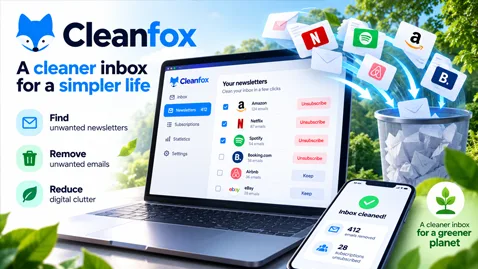
Discover how Cleanfox helps you remove unwanted newsletters, organize your inbox, and reduce email clutter. Explore its features, privacy considerations, and benefits for email management.
Cleanfox: How to Clean Your Inbox, Remove Unwanted Emails, and Reduce Digital Clutter
Email overload has become a common problem for millions of internet users. Newsletters, promotional messages, shopping notifications, and unwanted subscriptions can quickly turn an inbox into a disorganized space. Cleanfox offers a free solution to help users regain control of their email accounts while promoting more responsible digital habits.
What Is Cleanfox?
Cleanfox is an email cleaning service designed to help users identify, organize, and remove unwanted newsletters and promotional emails.
Available through its website and mobile applications, the platform simplifies inbox management by automatically identifying recurring email senders and allowing users to decide which messages they want to keep.
Unlike traditional email clients, Cleanfox focuses primarily on cleaning existing mailboxes and managing unwanted subscriptions rather than sending or receiving messages.
Its objective is straightforward: help users spend less time managing unnecessary emails and more time focusing on important communications.
How Does Cleanfox Work?
Cleanfox analyzes a connected email account to identify newsletters and recurring promotional messages.
Once the analysis is complete, users can review their subscriptions and take action.
1. Connect Your Email Account
Users begin by connecting a compatible email account to Cleanfox.
The service then scans the mailbox to identify newsletters and other supported categories of messages.
Depending on the email provider, the connection process may require additional authentication or authorization.
2. Identify Unwanted Newsletters
Cleanfox organizes detected newsletters by sender and provides useful information, including:
- The number of messages received.
- The number of messages opened.
- The identity of recurring senders.
- The subscriptions that may no longer be useful.
This overview helps users identify which newsletters deserve their attention and which ones simply occupy space.
3. Clean Your Inbox
Cleanfox provides three main actions:
Keep: Retain the newsletter and its existing messages.
Delete: Move existing messages to the trash while continuing to receive future emails.
Delete and Block: Move existing messages to the trash and automatically remove future messages from the selected sender.
The distinction is important: blocking future newsletters through Cleanfox does not necessarily cancel the subscription directly with the sender.
The service also offers a list view for managing multiple newsletters more efficiently.
Why Email Cleaning Matters
An overloaded inbox creates several practical problems.
Important messages can become difficult to locate, promotional notifications can interrupt daily activities, and unnecessary emails can consume storage space.
Regular email cleaning offers several advantages.
Better Productivity
Reducing unnecessary messages helps users focus on important communications.
A cleaner inbox can also simplify searching, organizing, and prioritizing incoming emails.
Improved Email Organization
By identifying recurring senders, users gain a clearer understanding of which companies and services regularly contact them.
This makes it easier to maintain useful subscriptions while removing unwanted content.
Reduced Digital Clutter
Removing obsolete newsletters and promotional emails helps keep mailboxes organized and reduces unnecessary stored data.
Although the environmental impact of deleting individual emails varies depending on the infrastructure involved, responsible digital storage management can contribute to broader efforts to reduce unnecessary resource consumption.
Cleanfox and Environmental Responsibility
One of Cleanfox's distinctive features is its environmental positioning.
The company encourages users to consider the environmental impact of digital communications and unnecessary email storage.
Email infrastructure depends on data centers, networking equipment, storage systems, and electricity.
Every message involves some combination of data transmission, processing, and storage.
However, the environmental impact of an individual email cannot be represented accurately by a single universal carbon-emission figure. It varies according to factors such as message size, attachments, storage duration, and infrastructure efficiency.
Cleanfox also highlights environmental initiatives, including a reforestation partnership with WeForest.
The broader message is that reducing unnecessary digital activity can be part of more sustainable technology practices.
Is Cleanfox Really Free?
Yes. Cleanfox presents its email cleaning service as free, without subscription fees.
However, understanding its business model is important.
Cleanfox was developed by Foxintelligence, a company acquired by NielsenIQ in 2021.
Rather than charging users directly, the business generates revenue through statistical analysis of e-commerce information.
According to Cleanfox, the service processes selected information from newsletters and commercial transactions to produce market research insights.
The company states that personal correspondence is excluded from this analysis and that its statistical data processing follows applicable privacy regulations.
This business model illustrates an important principle of digital services: a free application may still generate commercial value from certain categories of user data.
What About Email Privacy and Security?
Connecting a third-party service to an email account deserves careful consideration.
Email accounts often contain sensitive information, including personal correspondence, invoices, account notifications, and transaction records.
Cleanfox states that its automated processing focuses on newsletters and commercial transaction data rather than personal correspondence.
Nevertheless, users should review the service's privacy policy, data-processing practices, and requested mailbox permissions before connecting an account.
Important questions include:
- What information can the application access?
- Which categories of messages are processed?
- How long is information retained?
- Can users revoke mailbox access?
- How can users request deletion of their account and associated data?
Users should also follow their email provider's security recommendations and enable multi-factor authentication whenever available.
Does Cleanfox Protect Against Spam and Phishing?
Cleanfox can help reduce unwanted newsletters and promotional clutter, but it should not be confused with a comprehensive email security solution.
Spam filtering, phishing detection, malware scanning, and sender authentication involve additional technologies.
For example:
SPF (Sender Policy Framework) identifies servers authorized to send email using a particular SMTP identity.
DKIM (DomainKeys Identified Mail) allows receiving systems to verify cryptographic signatures associated with messages.
DMARC (Domain-based Message Authentication, Reporting, and Conformance) combines authentication results with domain alignment checks and published policies.
These mechanisms help email providers evaluate sender authenticity and reduce certain forms of domain impersonation.
Cleanfox addresses a different problem: managing unwanted messages that have already reached the user's mailbox.
Both approaches can complement each other, but they serve different purposes.
Cleanfox vs. Traditional Spam Filters
Traditional spam filters operate primarily during message reception or processing.
They evaluate characteristics such as sender reputation, message content, authentication results, and suspicious behavior.
Depending on the provider's filtering rules, messages may be accepted, quarantined, rejected, or delivered to the spam folder.
Cleanfox operates at the mailbox-management level.
Its role is to help users identify and remove unwanted newsletters and recurring promotional communications.
A message can be legitimate, authenticated, and successfully delivered while still being unwanted by the recipient.
This distinction is fundamental to understanding email deliverability.
Successful email delivery does not automatically mean the recipient wants the message.
What Cleanfox Reveals About Email Deliverability
For businesses that send newsletters and marketing communications, tools such as Cleanfox highlight the importance of maintaining relevant subscriber relationships.
A technically well-configured email infrastructure is only one part of successful email communication.
Organizations should also consider:
- Whether recipients genuinely want their messages.
- Whether subscription preferences are respected.
- Whether unsubscribe mechanisms are easy to use.
- Whether mailing lists are regularly maintained.
- Whether sending frequency matches subscriber expectations.
- Whether email content provides meaningful value.
Unwanted messages can negatively affect engagement and contribute to poor sender reputation.
For email marketers, the goal should not simply be to reach the inbox but to deliver messages that recipients actually value.
Final Thoughts
Cleanfox provides a practical approach to reducing email overload by helping users identify newsletters, remove unnecessary messages, and manage recurring promotional communications.
Its free model and environmental positioning make it an interesting example of how email management services are evolving.
However, users should understand the data-processing model and permissions involved before granting a third-party service access to their mailbox.
For businesses, the popularity of email cleaning tools reinforces an important lesson: effective email communication requires more than technical deliverability.
Authentication, sender reputation, recipient engagement, privacy, and content relevance all contribute to a healthier email ecosystem.
A cleaner inbox benefits users, while responsible sending practices benefit the entire email infrastructure.
Official website: https://www.cleanfox.io/
Sources: Cleanfox official website, How It Works, and FAQ documentation.
DelivMail — Email Deliverability, Authentication & Security Insights.
Comments (0)
No comment yet. Be the first!