Apple Fixes Hide My Email Privacy Flaw That Exposed Real Email Addresses
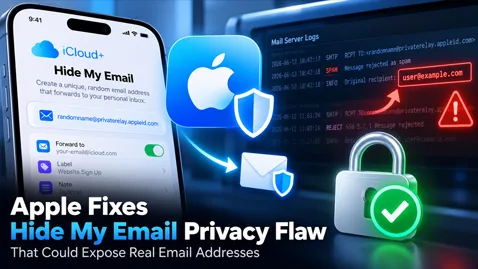
Apple has fixed a privacy vulnerability in its iCloud+ Hide My Email feature that could reveal users' real email addresses through mail server logs. Discover how the flaw worked, the remaining privacy risks, and what users can do to stay protected.
Apple Fixes “Hide My Email” Privacy Flaw That Could Expose Users’ Real Email Addresses
A security vulnerability in Apple's iCloud+ Hide My Email feature could have exposed users' actual email addresses. Although Apple released a fix in July 2026, previously leaked information may still exist in third-party mail server logs.
A Privacy Feature Designed to Protect Users
Apple's Hide My Email feature, available through iCloud+, allows users to create random email addresses that automatically forward messages to their personal inboxes.
The service is designed to protect users' identities when registering on websites, subscribing to newsletters, or communicating with online services.
Instead of revealing their primary email address, users can provide a randomly generated alias.
This approach helps reduce unwanted marketing messages, limit online tracking, and protect personal information from potential data breaches.
However, a recently disclosed vulnerability revealed that this protection was not always reliable.
A Vulnerability Reported More Than a Year Before the Fix
The security issue was discovered by Tyler Murphy, co-founder of EasyOptOuts, a service focused on personal data privacy.
According to Murphy, the vulnerability was first reported to Apple in June 2025.
Apple initially acknowledged the report and indicated that an investigation was underway.
In March 2026, the company reportedly claimed the issue had been resolved. However, subsequent testing suggested that the vulnerability remained exploitable.
After months of unsuccessful communication, Murphy brought the issue to the attention of technology publication 404 Media.
Following public disclosure, Apple reportedly deployed a security fix on July 3, 2026.
How Could Hide My Email Reveal a Real Email Address?
The vulnerability involved an unexpected interaction between Apple's email forwarding infrastructure and spam filtering systems.
Under normal circumstances, Hide My Email works as follows:
- Apple generates a random email alias.
- A sender sends a message to that alias.
- Apple's infrastructure forwards the message to the user's actual mailbox.
- The sender never sees the recipient's real email address.
However, the vulnerability emerged when certain incoming messages were automatically rejected as spam.
In these situations, the user's actual email address could appear in technical information recorded by the sending mail server.
This created several privacy concerns:
- No user interaction was required for the exposure to occur.
- A legitimate email incorrectly classified as spam could trigger the problem.
- The recipient might never know that their real address had been exposed.
- Third-party mail servers could retain the information in their logs.
The issue was particularly concerning because the exposure could occur during routine email processing rather than through a direct attack on an account.
Why the Privacy Risk May Continue After the Fix
Although Apple has reportedly corrected the underlying vulnerability, the consequences may not have disappeared entirely.
Email servers frequently maintain technical logs containing information about message delivery, SMTP responses, rejected messages, and processing errors.
These logs help administrators troubleshoot delivery failures, investigate suspicious activity, and maintain infrastructure reliability.
Depending on the service provider, logs may be retained for months or even years.
Researchers warned that Hide My Email aliases created before July 7, 2026, could potentially have been affected.
This does not mean every user's real address was exposed.
The vulnerability required specific circumstances, and there is currently no straightforward way for individual users to determine whether their information appeared in third-party server logs.
Furthermore, correcting the forwarding behavior does not automatically delete information previously recorded by external systems.
Apple Faces Legal Action in the United States
The controversy has also resulted in legal proceedings.
A lawsuit filed in the United States alleges that Apple promoted Hide My Email as a privacy protection service while failing to address a known vulnerability promptly.
The plaintiffs are seeking class-action status and have raised allegations involving California consumer protection and misleading advertising laws.
The legal proceedings highlight broader questions about how technology companies communicate privacy guarantees and respond to security vulnerabilities.
However, the allegations remain subject to judicial review and should not be interpreted as an established finding of liability.
What This Incident Reveals About Email Infrastructure Security
This vulnerability highlights an often-overlooked aspect of email security: sensitive information can be exposed through technical processes even when the primary service appears to function correctly.
Email delivery involves multiple interconnected systems, including:
- SMTP servers: Responsible for transferring messages between mail systems.
- DNS infrastructure: Used to identify destination mail servers and publish authentication records.
- Spam filters: Responsible for identifying and rejecting suspicious messages.
- Email forwarding services: Used to redirect messages between addresses.
- Server logging systems: Responsible for recording transactions, errors, and delivery events.
- Mail delivery agents: Responsible for placing accepted messages into recipient mailboxes.
A privacy-focused email service must protect sensitive information throughout this entire process.
That includes normal delivery operations, but also rejected messages, error responses, forwarding failures, and diagnostic logging.
The Importance of SMTP Error Handling
SMTP servers exchange status codes to indicate whether a message has been accepted, temporarily deferred, or permanently rejected.
For example:
- 250: Requested mail action completed successfully.
- 450: Requested mail action not taken because of a temporary mailbox-related condition.
- 550: Requested action not taken, often because a mailbox is unavailable or a policy rejects the message.
These responses are essential for reliable email delivery.
However, systems must ensure that error messages and associated logs do not unintentionally expose confidential information.
The Apple incident illustrates why email security assessments should include error-handling behavior and logging practices, not just successful message delivery.
What Can Users Do to Protect Their Email Privacy?
Despite this vulnerability, Hide My Email remains a useful tool for limiting the exposure of personal email addresses.
Users can take several precautions to strengthen their protection:
- Use separate email aliases for different services. This makes it easier to identify where unwanted messages originate.
- Disable aliases that are no longer needed. Reducing unnecessary aliases can limit future exposure.
- Avoid publishing primary email addresses publicly. Use dedicated addresses for registrations and online services.
- Enable two-factor authentication. This helps protect accounts even if an email address becomes known.
- Remain cautious about phishing attempts. Attackers may use exposed contact information to create convincing fraudulent messages.
- Review privacy and security settings regularly. Keep devices and associated services updated.
Users do not necessarily need to replace every alias created before July 2026, but those with heightened privacy concerns may consider updating selected addresses.
Why Email Security Requires More Than Authentication
Email security is often associated with technologies such as SPF, DKIM, and DMARC.
These protocols play essential roles:
- SPF identifies authorized sending servers.
- DKIM verifies cryptographic signatures associated with email messages.
- DMARC evaluates authentication alignment and provides domain-level policies and reporting.
However, none of these technologies alone prevents confidential information from appearing in server logs.
Similarly, TLS encryption protects communications in transit but does not automatically prevent sensitive data from being recorded by systems processing those communications.
Effective email security requires a broader approach that includes authentication, infrastructure configuration, secure forwarding, careful logging, and ongoing monitoring.
Conclusion: Email Privacy Depends on the Entire Delivery Chain
Apple's Hide My Email vulnerability demonstrates that even sophisticated privacy services can be undermined by unexpected interactions between mail servers and filtering mechanisms.
The issue was not primarily about unauthorized access to email accounts. Instead, it involved the potential disclosure of personal information during routine message processing.
While Apple's July 2026 fix reportedly addressed the underlying vulnerability, information previously recorded in third-party logs may remain outside the company's control.
The key lesson is that email privacy depends on more than hiding an address or encrypting a connection. It requires securing every stage of the email delivery process, including failures, rejections, forwarding operations, and server logs.
For businesses and email infrastructure administrators, this incident reinforces the importance of comprehensive security testing, responsible data retention, and continuous monitoring.
Sources: Mac4Ever, July 22, 2026; reporting by 404 Media and disclosures attributed to EasyOptOuts.
Published for DelivMail — Email Deliverability, Authentication & Security Insights.
Comments (0)
No comment yet. Be the first!